A business website has one job: turning a visitor who does not know you into someone who contacts you. It can look beautiful and still fail at that. Here are the eight points we check before a business website goes live. You can verify them yourself, most in a few minutes.
Contents
1. The message is understood in five seconds
Open the home page and show it to someone who does not know your business. Can they say what you do, for whom, and what to do next? If the answer wavers, the first screen needs rewriting.
2. The business website is designed for the phone first
In Benin, DataReportal’s Digital 2026 report counts 16.4 million mobile connections for 4.8 million internet users: internet access goes through the phone. Test each page on a narrow screen: text readable without zooming, buttons big enough for a thumb, a short form.
3. It loads fast, even on an average connection
Google measures real visitor experience with three indicators, the Core Web Vitals.
| Metric | What it measures | “Good” threshold |
|---|---|---|
| LCP | Time to display the main content | 2.5 seconds or less |
| INP | Responsiveness when you tap or click | 200 milliseconds or less |
| CLS | Layout stability | 0.1 or less |
A Google study published in 2016 already found that more than half of mobile visits are abandoned when a page takes longer than three seconds to load. The free PageSpeed Insights tool gives you your figures.
4. Contact is one tap away
A clickable number, a WhatsApp button, a form that asks only for what is needed. Every extra field loses enquiries. And every page should end with a clear action.
5. Proof is visible
Past work, real photos, client reviews, verifiable figures. A hesitant visitor is looking for a reason to believe you. Do not ask them to take your word for it.
6. SEO basics are in place
- A unique title and description for every page.
- A single main heading (H1) per page.
- Compressed images with alt text.
- A sitemap submitted to Search Console.
- An up-to-date Google Business Profile if you welcome customers.
7. You can measure what happens
Without measurement, you cannot know whether your business website is working. At minimum: Search Console for the searches that lead to you, and a count of enquiries received each month.
8. The legal framework is respected
Legal notice, privacy policy, and a cookie banner that really loads no tracker before the visitor agrees. It is mandatory in many countries, and a sign of seriousness everywhere.
Key point. A business website is judged by the number of enquiries it brings, not by the number of compliments it gets.
And after launch
A business website is not finished on launch day. Updates, backups and regular new content make the difference between a site that ages and a site that improves. These eight points are part of every business website we deliver. Already have a site and a doubt about one of them? Write to us and we will take a look.
The pages a business website must contain
A business website does not need thirty pages. It needs the right ones, each with a precise role.
| Page | Its role |
|---|---|
| Home | Saying in a few seconds what you do and for whom |
| Services or offers | One page per service, to be found for each search |
| Work or references | Proving by example |
| About | Showing who is behind the business |
| Contact | Making it obvious how to get in touch |
| Legal notice and privacy | Complying with the law and reassuring |
A common mistake is putting everything on the home page. A one-page business website reads well, but it can only rank for very few searches.
Writing the home page of a business website
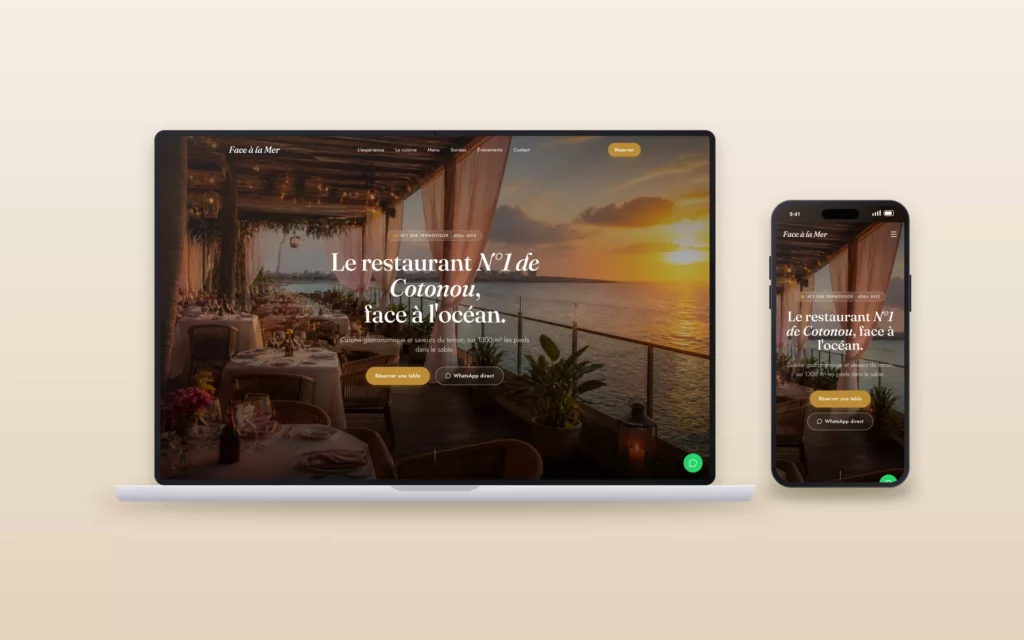
The first screen carries almost all the weight. It must contain four elements, in this order.
- A sentence saying what you do. Concrete, with no jargon: “Accounting firm for SMEs in Cotonou” beats “Your trusted partner”.
- A sentence stating the benefit. What the client gets, not what you are.
- An action button. Just one, and clear: ask for a quote, book, call.
- A piece of proof. A figure, a client logo, a real photo.
The rest of the page answers objections in the order they come: for whom, how it works, how long, who else has trusted you.
Photos and visuals
Stock images are spotted immediately and do not inspire trust. For a business website, a few real photos are worth more than twenty generic images: your team, your premises, your work in progress, your products.
- Take them in natural light, near a window.
- Frame wide, you can always crop later.
- Compress each image before uploading it.
- Fill in alt text that describes what is shown.
A single image of several megabytes can slow the whole page on a mobile connection.
A form that does not scare people away
Every extra field lowers the number of enquiries. For a business website, four fields are almost always enough: name, a way to reach you, the need, and possibly a deadline.
| Do | Avoid |
|---|---|
| Say what happens after sending | A “Send” button with no follow-up |
| Show a clear confirmation message | A page that reloads and says nothing |
| Send an acknowledgement by email | Leaving the client in doubt |
| Protect the form against spam | A captcha unreadable on mobile |
Test your form yourself, every month. A broken form is the costliest failure of a business website, because it cannot be seen.
Accessibility, so nobody is left out
An accessible business website is one everyone can use, including with poor eyesight, a small screen or a slow connection. The basics fit in a few points.
- Enough contrast between text and background.
- A text size readable without zooming.
- Buttons that are large enough and spaced enough.
- Navigation that works with the keyboard.
- Alt text on images that carry information.
These rules, described by the W3C in the WCAG guidelines, also improve comfort for every visitor and help search engines read the page.
The security of a business website
A business website does not handle payments, but it is still a target: spam sending, fraudulent redirects, unwanted content. Four habits cut the risk sharply.
- An active HTTPS certificate, shown by the padlock in the browser.
- Regular updates of the software and plugins.
- Unique passwords and two-factor authentication for administrator accounts.
- An automatic backup, stored somewhere other than the server.
Domain name and professional email
The domain name is the address of your business website. It must be registered in your name, or your company’s, never the provider’s. Choose it short, easy to dictate on the phone and without a hyphen if possible.
An email address on your own domain inspires more trust than a free one. It needs three technical settings, SPF, DKIM and DMARC, which stop your messages ending up in spam. Ask your provider whether they are in place.
Writing a service page
This is the page that works hardest on a business website, because it is the one people find when searching for a precise service. It always follows the same logic.
- The client’s problem, in their words.
- What you offer, concretely: what is included, what is not.
- How it works, step by step.
- Proof: an example, a figure, a review.
- Frequently asked questions about this service.
- A call to action, identical to the one at the top of the page.
One page per service, rather than one page listing them all, lets each be found separately. It is one of the most profitable changes on a business website.
The About page, read more than you think
Before contacting you, many visitors want to know who they are dealing with. The About page is not a company history. It answers three questions: who are you, why do you do this job, and why should people trust you.
Put a real photo there, your background in a few lines, the way you work and your contact details. On the business website of a freelancer or small team, this page often weighs more in the decision than the home page.
A business website in several languages
If your customers speak English and French, a bilingual business website widens your market. It calls for a little rigour.
- Each page exists in each language, with its own address.
- The language switcher is visible, at the top and bottom of the page.
- Titles, descriptions and button labels are translated, not just the paragraphs.
- Proofreading by someone who speaks the language avoids clumsy translations.
Local search for a business website
For a business serving a city or region, being found locally matters more than anything. Three actions are enough to get ahead.
- Write the area served on the site. “Plumber in Cotonou and Abomey-Calavi” in the home page title and in the footer.
- Create your Google Business Profile. It shows your business on Google Maps, with hours, photos and reviews.
- Keep the same contact details everywhere. The name, address and phone on the business website must match the profile and social networks.
Add a map, opening hours and a clickable number to the Contact page. Visitors look for this information, and search engines read it too.
The 90 days after launch
| Period | What to do |
|---|---|
| First week | Submit the sitemap to Search Console, test every form |
| First month | Create or complete the Google Business Profile, ask for first reviews |
| Second month | Read the searches that bring visitors, adjust titles |
| Third month | Add a piece of work or an article, measure enquiries received |
A business website that gets new content every month improves. A business website left as it is slips back slowly, because competitors keep moving.
Six signs it is time to rebuild your business website
- You hesitate to give the address to a client.
- You have to zoom to read it on a phone.
- It takes more than three seconds to load.
- You can no longer change anything without calling someone.
- It has brought you no enquiry for months.
- It no longer reflects what you do.
One of these signs alone does not justify a rebuild. Three or more, and the business website is probably losing you clients without you knowing.
The most common mistakes
- Copy that talks about the company instead of the client.
- A phone number in an image, impossible to tap to call.
- Out-of-date opening hours or prices.
- A pop-up that opens before the visitor has read a line.
- No page for each service, so no chance of being found for those searches.
Free tools to check for yourself
| Tool | What it checks |
|---|---|
| PageSpeed Insights | Speed and Core Web Vitals |
| Search Console | Indexing and the searches that lead to you |
| Rich Results Test | Structured data |
| Your browser’s mobile mode | Display on a small screen |
| A call to your own number | That the phone link works |
Ten minutes a month with these tools is enough to spot most problems before your visitors do.
Questions people ask about a business website
Is a business website enough to find clients?
Yes, if it is found and leads to an action. It works even better with an up-to-date Google profile and some useful content.
Can a business website become a store later?
Yes on WordPress: WooCommerce is added to the existing site, with no need to start over.
Does a business website need a blog?
Not necessarily. A blog only makes sense if you regularly publish answers to your customers’ questions.
Who should be able to edit the business website?
You. Insist on administrator access in your name and a short training session at delivery.
A short glossary
- Call to action: the button or link that invites the visitor to act.
- Domain name: the address of your site, such as yourcompany.com.
- Hosting: the server that keeps the site online.
- HTTPS: the secure connection, shown by a padlock.
- Alt text: the description of an image, read by search engines and screen readers.
- Sitemap: the file listing the site’s pages for search engines.
The full list to tick off
- The first screen says what you do, for whom, and what to do next.
- Each service has its own page.
- The site is readable and usable on a phone.
- The main page loads in under three seconds on mobile.
- The phone number can be tapped to call.
- A WhatsApp button or short form is visible on every page.
- The form has been tested, and the email does arrive.
- Past work, real photos or reviews are visible.
- Every page has a unique title and description.
- Images are compressed and described.
- The sitemap has been submitted to Search Console.
- The Google Business Profile is up to date.
- The site runs on HTTPS.
- An automatic backup is in place.
- The legal notice and privacy policy are published.
- The cookie banner loads no tracker before consent.
- You have administrator access in your name.
- The domain name is registered in your name.
How Aureva Digital delivers a business website
Every business website we deliver goes through this list before launch. We then hand over the access details, a short training session to edit your text and images, and a follow-up a few weeks later to read the first searches and first enquiries together. You can handle maintenance yourself or entrust it to us.
What this means for a business in Africa or Europe
The eight points apply everywhere, with different weights. In West Africa, the phone is the main screen and connections vary: a light page, compressed images and a visible WhatsApp button make more difference than any visual effect. A clickable number and clear opening hours answer the first question most visitors have.
In Europe, visitors compare more providers before contacting one. Proof, detailed service pages and legal compliance carry more weight, and the cookie banner must really respect the visitor’s choice.
If you serve both, a bilingual business website with the same structure in each language is the simplest route. Keep the same proof and the same calls to action, and adapt only what differs: payment habits, contact channels and examples.
In short
- A business website must explain what you do in five seconds, load fast on a phone and make contact effortless.
- Show proof, set up the SEO basics and measure enquiries from day one.
- Keep it legal and keep it updated after launch.
Sources
Written by Amadeus AvlekaFounder of Aureva Digital, designer and web developer based in Cotonou. Learn more